
HappyScribe is an AI-powered platform for transcription, subtitling, translation, and meeting notes. It is designed to help individuals, creators, businesses, journalists, researchers, and teams turn audio and video into useful written content.
The platform combines AI-powered speech-to-text tools with subtitle editing, translation, AI meeting notes, collaboration, and human proofreading services. It supports more than 150 languages for AI transcription and subtitles, while its translation tools cover more than 80 languages.
About HappyScribe

HappyScribe provides a single workspace for working with audio and video content. Users can upload recordings, transcribe spoken content, create subtitles, translate material, edit transcripts, and export their finished files in multiple formats.
The platform has also expanded into meeting intelligence. Its AI Notetaker can record and transcribe meetings from services such as Zoom, Google Meet, and Microsoft Teams, while generating summaries, decisions, and action items.
HappyScribe currently says its platform is used by more than 6 million users and 41,000 teams.
What Does HappyScribe Offer?
HappyScribe brings several audio, video, and language tools together in one platform.
AI Transcription
AI transcription is one of the main features of HappyScribe.
Users can upload audio or video files and convert spoken content into text. The platform supports more than 150 languages and includes automatic speaker detection, which can help identify different people in a conversation.
This can be useful for interviews, podcasts, lectures, meetings, webinars, research recordings, and other spoken-content workflows.
Subtitle Creation
HappyScribe can automatically generate subtitles from video content.
The platform includes a subtitle editor where users can review the generated captions, adjust timing, make corrections, and customize the final subtitle output.
It supports a variety of subtitle export formats, including SRT, VTT, STL, XML, FCPXML, EDL, and other professional formats depending on the plan.
This makes the platform useful for YouTube creators, video editors, filmmakers, media teams, and businesses working with multilingual video content.
Subtitle Editor

The subtitle editor provides a workspace for refining captions after automatic generation.
Users can adjust subtitle timing, correct text, and work with formatting options before exporting the finished subtitles. HappyScribe also provides a Quality Center with settings for subtitle timing and transcription customization.
AI Translation
HappyScribe also provides AI translation for subtitles and other content.
Its AI translation tools support more than 80 languages, allowing users to take existing transcriptions or subtitles and adapt them for different audiences.
The platform distinguishes translation from adaptation. Translation focuses on conveying the original message naturally in another language, while adaptation can involve adjusting the content for the target audience and context.
This can be useful for creators and organizations that want to make their videos accessible to audiences in multiple countries.
AI Notetaker
The AI Notetaker is another major part of HappyScribe.
It can record and transcribe meetings from platforms including Zoom, Google Meet, and Microsoft Teams. The system can identify speakers and turn meeting conversations into summaries, decisions, and action items.
The Notetaker can also work with calendar integrations, making it easier for teams to capture recurring meetings.
AI Meeting Summaries
Instead of stopping at a raw transcript, HappyScribe can turn meeting conversations into structured notes.
Users can receive summaries containing key decisions, next steps, action items, owners, and deadlines. Custom summary templates can also be used on supported plans.
This can save time for teams that need to review meetings without going through an entire recording.
AI Chat
HappyScribe also includes AI Chat for working with recorded conversations.
Users can ask questions about their transcripts and search across captured meetings. The platform can provide answers linked to specific moments in the underlying transcript, making it easier to locate relevant information.
For teams with many interviews, customer calls, meetings, or research sessions, this can turn a large collection of transcripts into a searchable information source.
Human Transcription and Proofreading
HappyScribe does not rely entirely on AI.
The platform also offers human-made transcription, subtitling, translation, and proofreading services. Human proofreading is available as an additional service, with pricing depending on factors such as language, file length, currency, urgency, and editing requirements.
This gives users an alternative when an AI-generated transcript needs additional human review.
Collaboration and Integrations
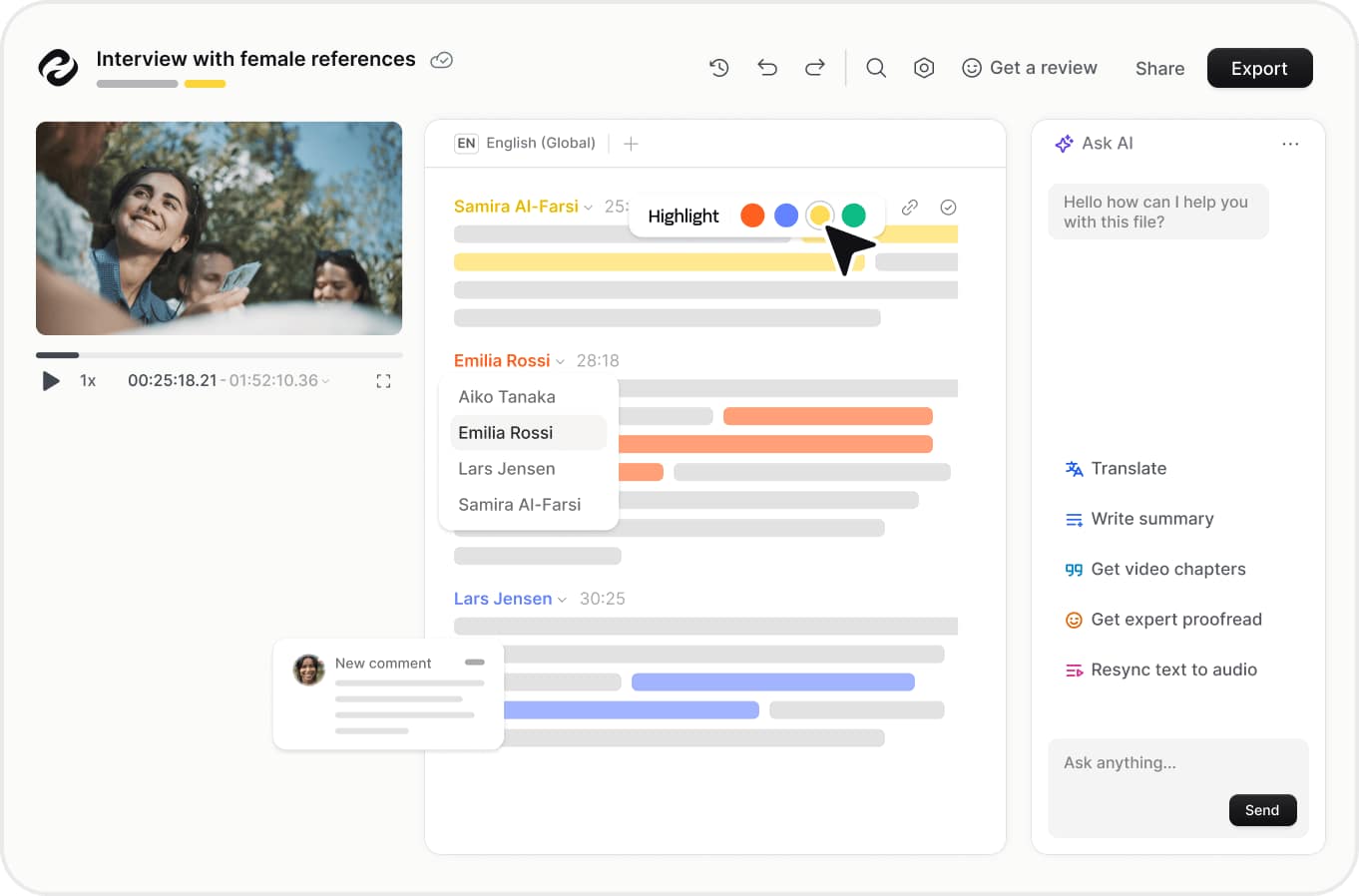
HappyScribe supports collaborative editing, comments, and highlights, making it possible for multiple people to work on the same content.
It also integrates with services such as YouTube, Vimeo, Google Drive, Dropbox, Box, and Zapier. API access is available on supported paid plans.
For businesses, these integrations can make it easier to move recordings and finished transcripts between different parts of an existing workflow.
Mobile Recording
HappyScribe also supports recording through its mobile app.
Users can record interviews, lectures, meetings, and other conversations directly from their phone, with live transcription available in more than 150 languages. The platform lists mobile support for both iPhone and Android.
This can be useful for journalists, students, researchers, and professionals who frequently record conversations away from their desks.
HappyScribe Pricing
HappyScribe offers Free, Basic, Pro, and Business plans, along with an Enterprise option.
The Free plan includes a 10-minute trial for AI transcription, subtitling, and translation, as well as unlimited meeting recordings with a 45-minute limit per recording.
The Basic plan starts at $17 per month when billed monthly or $8.50 per month with annual billing. Pro starts at $29 monthly or $19 with annual billing, while Business starts at $89 monthly or $59 with annual billing.
The paid plans include different amounts of AI transcription, subtitling, and translation minutes, with additional credits available at $0.20 per minute on the listed plans.
Pricing and included features can change, so users should check the current plan details before subscribing.
Pros and Cons of HappyScribe
Pros
- AI transcription in 150+ languages
- AI translation in 80+ languages
- Automatic speaker detection
- Subtitle creation and editing
- AI meeting summaries and action items
- AI Chat for analyzing transcripts
- Human proofreading and transcription services
- Multiple professional export formats
- Collaboration tools
- Integrations with major video, storage, and meeting platforms
- Mobile recording and transcription
Cons
- Monthly AI minutes are limited on paid plans
- Additional transcription credits cost extra
- Advanced features are mainly aimed at paid users
- Human-made services cost more than standard AI processing
- Large teams may need higher-tier plans for workspace controls
- Accuracy can still depend on audio quality, speakers, accents, and background noise
Who Is HappyScribe Best For?
HappyScribe can be useful for creators who regularly work with video, podcasts, interviews, and other spoken content.
Journalists and researchers can use it for interviews and recordings, while YouTube creators and video teams can use the platform for subtitles and translations.
Businesses can use the AI Notetaker for meetings, summaries, and action items. Teams that work across different languages can also use its transcription and translation capabilities to make content easier to share.
Is HappyScribe Worth It?
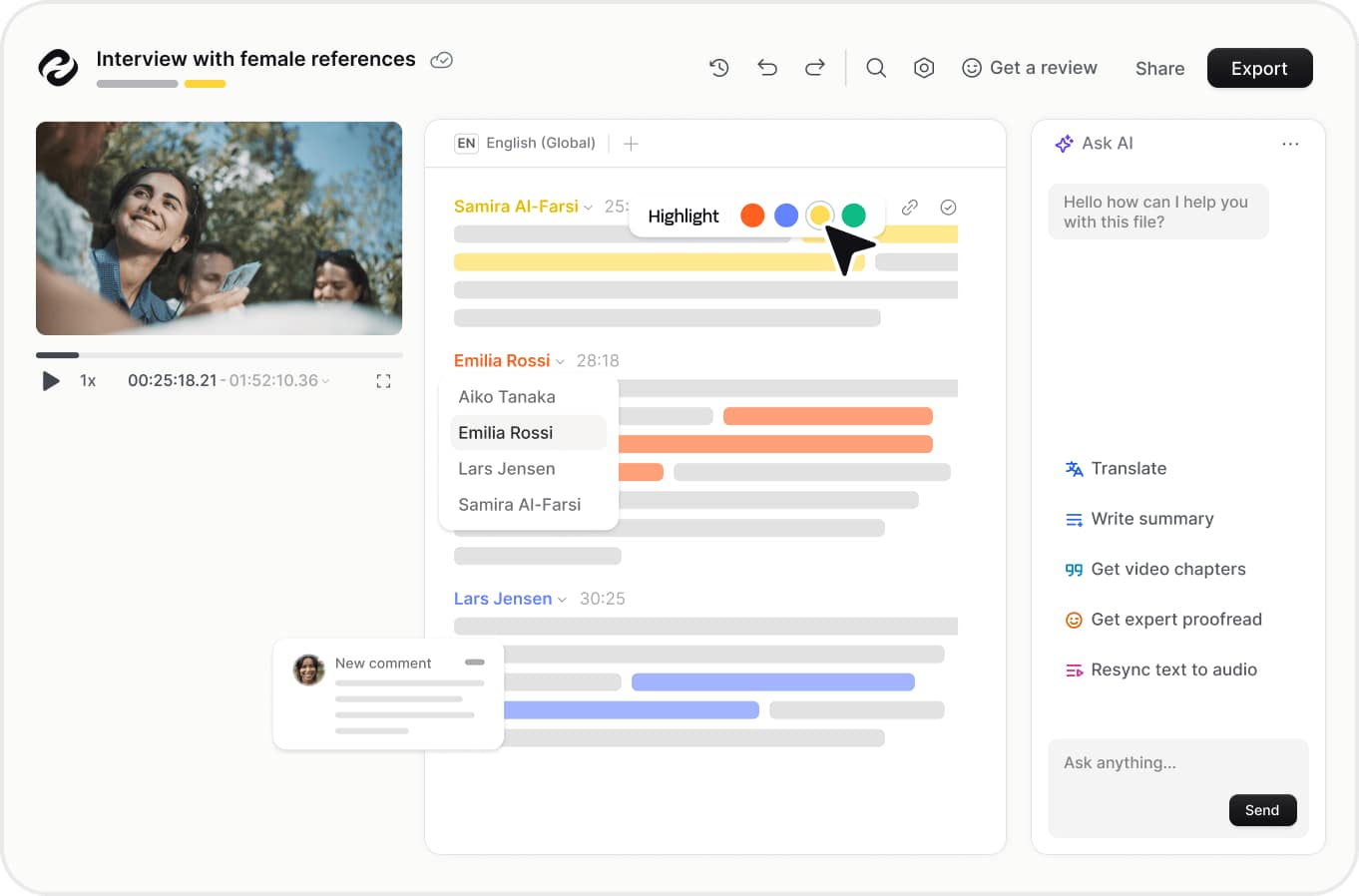
HappyScribe combines transcription, subtitles, translation, meeting notes, AI analysis, collaboration, and human language services in one platform.
Its support for more than 150 transcription and subtitle languages, automatic speaker detection, AI meeting summaries, subtitle editing, and professional export formats gives it a broad range of applications.
The main factor to consider is usage. Someone who only needs occasional transcription may find the Free plan sufficient for testing the service, while frequent creators, professionals, and teams may need a paid plan with more monthly minutes and additional features.
Final Verdict
HappyScribe is a versatile platform for turning spoken content into transcripts, subtitles, translations, and structured meeting notes.
Its combination of AI transcription, subtitle editing, multilingual translation, AI Notetaker, AI Chat, collaboration tools, integrations, and human proofreading makes it useful across several types of content workflows.
For creators, professionals, researchers, journalists, and teams that regularly work with audio, video, meetings, or multilingual content, HappyScribe is worth considering.