
Modern teams often need more than a simple project management tool to turn ideas into finished work. Brainstorming, planning, workshops, diagrams, presentations, product development, and team collaboration can all require different tools. Miro brings many of these activities together in one visual workspace built around an interactive canvas.
The platform has evolved beyond its original digital whiteboard concept and now includes structured formats, collaboration tools, AI features, integrations, diagramming, project planning, and other workflows.
About Miro
Miro is an online collaborative workspace designed for teams to work together visually. Its canvas can be used for brainstorming, customer journey mapping, user stories, roadmaps, diagrams, workshops, presentations, and project planning.
Instead of working with a fixed document layout, users can place different types of content across a flexible canvas. Teams can collaborate in real time or work asynchronously, making the platform suitable for both remote and in-office teams.
What Does Miro Offer?
Miro combines visual collaboration with a growing collection of structured work formats and AI-powered features.
Online Whiteboard
The online whiteboard remains one of Miro’s central features. Teams can use an infinite canvas to place text, sticky notes, shapes, images, diagrams, and other content.
The visual format makes it easier to arrange ideas spatially instead of keeping everything inside a traditional document.
Miro also provides templates that can help teams start activities such as brainstorming, retrospectives, customer journey mapping, product roadmaps, and business model planning.
Brainstorming and Workshops
Miro is particularly suited to collaborative sessions where multiple people need to contribute ideas.
Teams can use sticky notes, voting, timers, reactions, and other interactive features during meetings and workshops. Paid plans provide additional facilitation capabilities such as voting, timers, private mode, and other collaboration controls.
This makes the platform useful for product discovery, strategy sessions, retrospectives, planning meetings, and creative workshops.
Project Planning and Management
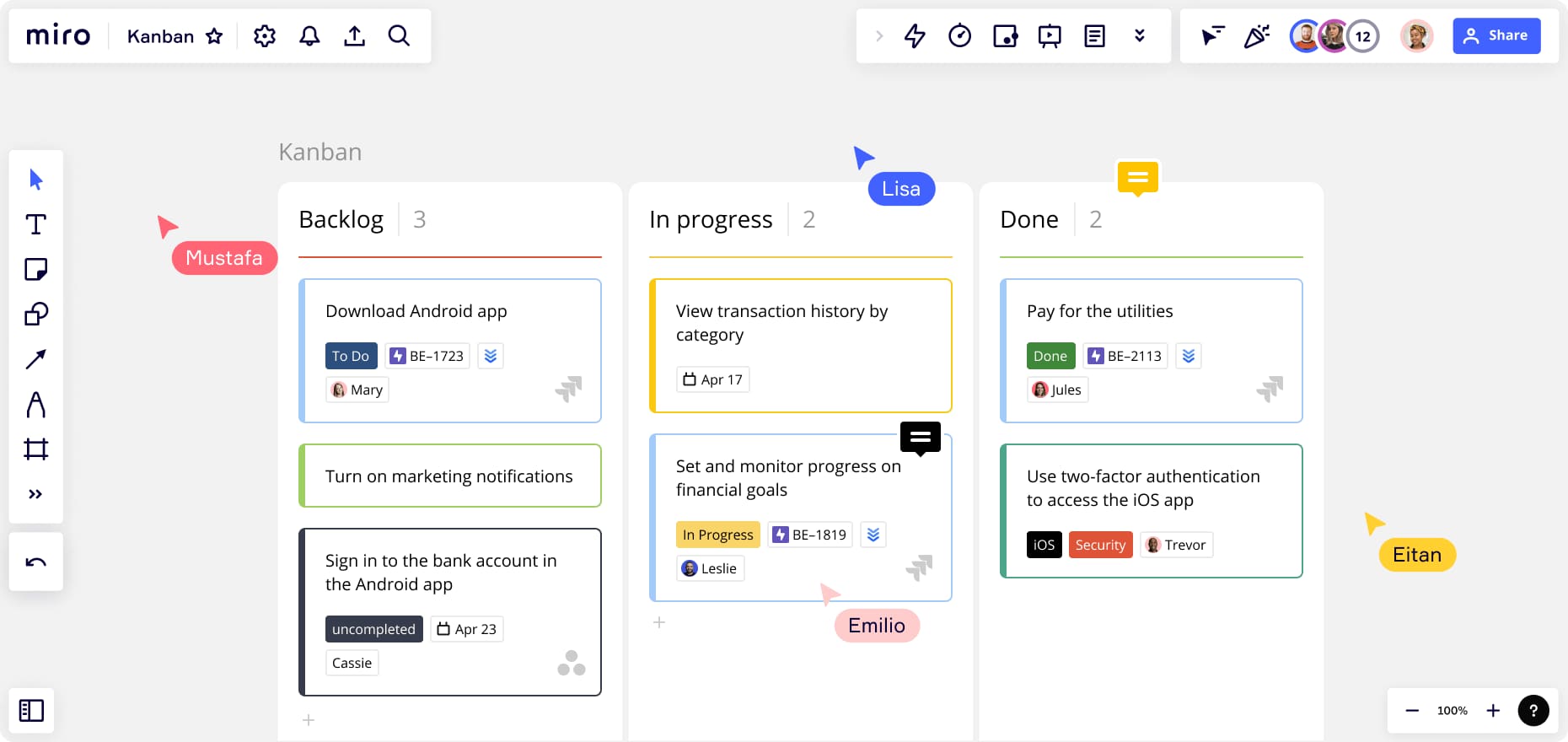
Miro can also be used to visualize projects and workflows.
Teams can create roadmaps, timelines, Kanban-style boards, diagrams, and structured tables. The platform supports formats including Docs, Tables, Timelines, Slides, Kanban, and Diagrams.
This gives teams the ability to move from an early idea to a more structured project plan without necessarily switching to a different workspace.
Diagramming and Visual Planning
Diagramming is another important part of Miro.
Users can create visual representations of processes, systems, workflows, and ideas. Business plans provide access to a larger collection of shapes and support visualizing technical systems and business processes using formats such as Mermaid, UML, AWS, and BPMN.
This can make Miro useful beyond creative brainstorming, particularly for teams working on product development, software, business processes, and technical planning.
Miro AI
Miro has expanded its platform with AI capabilities.
Depending on the plan, AI can help generate diagrams, tables, and summaries, cluster sticky notes, and support AI workflows. The Business plan adds more advanced AI workflows and agents designed to help teams create repeatable processes and work with AI directly on the canvas.
The platform also supports connections with AI tools through its MCP capabilities on eligible plans.
For teams already using visual collaboration, having AI available within the same workspace can reduce the need to move information between separate tools.
Templates and Integrations
Miro offers a large template library designed to help users start projects faster. The current pricing page highlights more than 7,000 Miro and community-made templates.
The platform also supports integrations with a wide range of workplace tools. Depending on the plan, users can connect services such as Microsoft, Slack, Google, Adobe, Jira, Asana, Azure DevOps, Trello, Confluence, Dropbox, and other applications.
These integrations can make Miro more useful as part of an existing business workflow rather than as an isolated whiteboard.
Miro Pricing
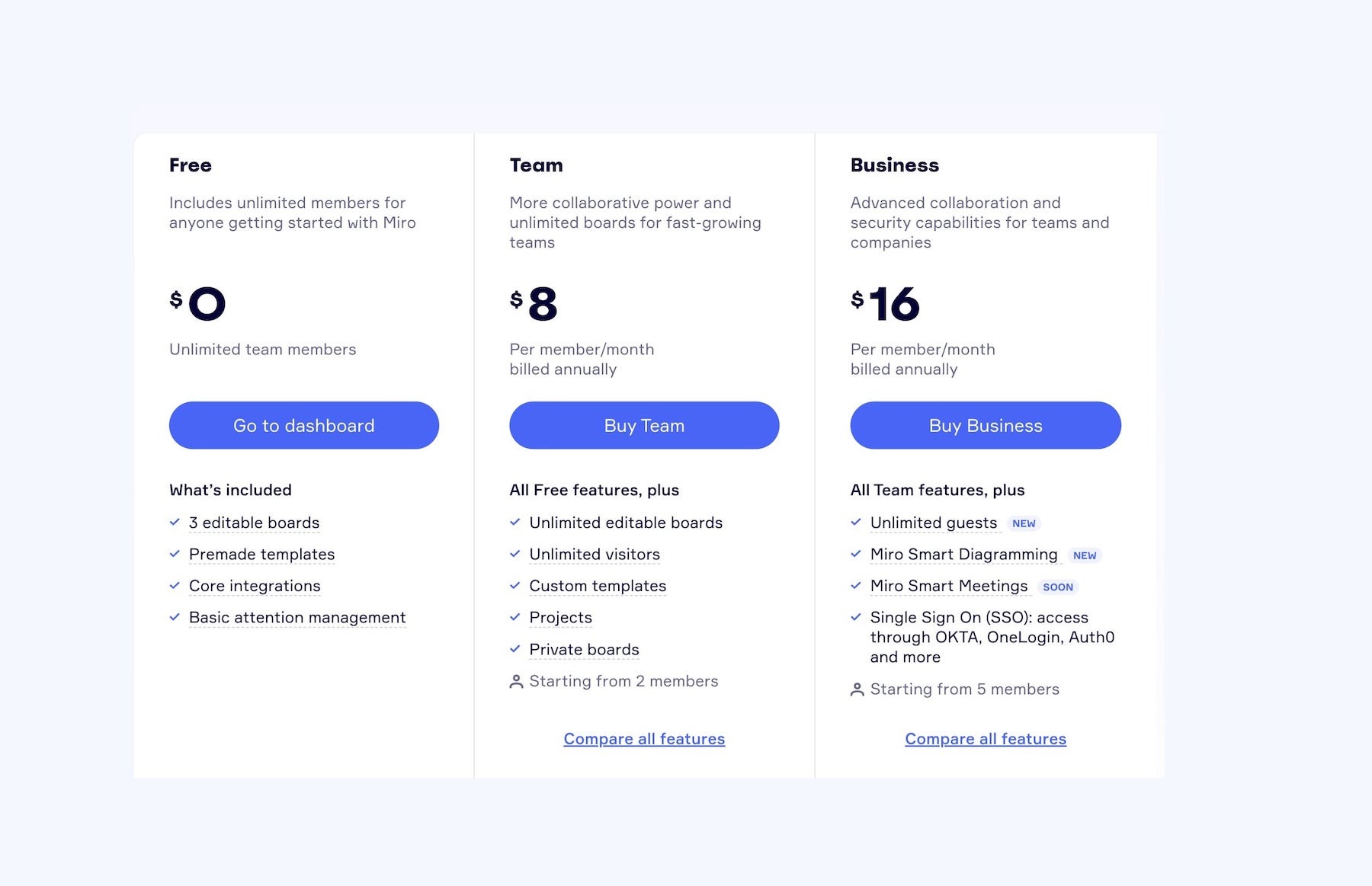
Miro currently offers Free, Starter, Business, and Enterprise plans.
The Free plan costs $0 and includes three editable boards, templates, structured formats, AI features, and integrations. The current Starter plan is listed at $8 per member per month when billed yearly, while Business is listed at $20 per member per month when billed yearly. Enterprise pricing is customized.
The Free plan can be useful for individuals and teams that want to try the platform, although it has limits on editable boards and some collaboration features.
Starter adds unlimited private boards, visitor editing, high-resolution exports, project spaces, voting, timers, and additional AI capabilities. Business adds features such as unlimited workspaces, guests, advanced diagramming, data tables, prototypes, AI workflows, and deeper integrations.
Annual billing currently provides a 20% saving compared with monthly billing.
Collaboration and Remote Work
Miro is designed with collaborative work in mind.
Teams can work on the same board, communicate through comments and chat, share screens, use presentation tools, and organize visual information together. Depending on the plan, features such as video calls, guest access, voting, timers, and advanced permissions are available.
This makes Miro relevant for distributed teams that need a shared visual workspace.
Pros and Cons of Miro
Pros
- Flexible infinite-canvas workspace
- Strong brainstorming and collaboration tools
- Large template library
- Supports diagrams, timelines, tables, slides, and Kanban
- AI-powered features and workflows
- Extensive integrations
- Useful for remote and hybrid teams
- Free plan available
- Suitable for product, design, strategy, and project workflows
- Multiple paid plans for different team requirements
Cons
- The large number of features can take time to learn
- Free plan has limits on editable boards
- Advanced features require paid plans
- Per-member pricing can become expensive for larger teams
- Some AI and collaboration features vary by plan
- Large boards can become difficult to organize without a clear structure
Who Is Miro Best For?
Miro can work well for product teams, designers, developers, marketers, consultants, educators, project managers, and organizations that rely heavily on collaborative visual work.
It can be particularly useful when a team needs to brainstorm, map processes, create roadmaps, conduct workshops, or visualize complex information.
Smaller teams and individuals can start with the Free plan, while larger organizations can use paid plans for additional collaboration, security, administration, AI, and workflow features.
Is Miro Worth It?

Miro has developed from a simple online whiteboard into a broader visual workspace for collaboration, planning, diagramming, project work, and AI-assisted workflows.
Its biggest advantage is the flexibility of its canvas. Teams can brainstorm ideas, organize information, create diagrams, build roadmaps, run workshops, and turn visual discussions into structured work.
The Free plan provides a practical way to explore the platform, while paid plans add private boards, advanced collaboration, integrations, AI capabilities, project organization, and other professional features.
Whether Miro is worth paying for depends on how heavily a team relies on visual collaboration and which advanced features it needs.
Final Verdict
Miro offers a broad set of tools for teams that want to combine brainstorming, planning, collaboration, diagrams, presentations, project workflows, and AI in one workspace.
Its flexible canvas and extensive templates make it easy to approach different types of work visually, while integrations allow teams to connect Miro with tools they already use.
For teams that regularly collaborate through visual boards, workshops, roadmaps, diagrams, and shared planning, Miro is worth considering. The Free plan is a useful starting point, while the paid plans become more relevant when teams need private boards, advanced collaboration, AI workflows, integrations, and larger-scale organization.