
Lovart is an AI-powered design platform built to help creators, marketers, designers, and businesses produce visual content from simple instructions. Instead of requiring users to work separately across image generators, video tools, editing software, and design applications, Lovart brings many of these creative tasks into one workspace.
The platform works as an AI design agent that can understand a creative brief, select suitable AI models, generate assets, edit them, apply brand guidelines, and prepare designs for export. Its tools cover everything from images and videos to social media graphics, advertisements, presentations, product visuals, and print-ready designs.
About Lovart

Lovart is designed around an agent-based approach to creative work. Users can provide a text prompt, upload reference files, add brand information, or combine these inputs to describe what they want to create.
The platform can then plan the creative task, generate visual assets, and arrange the results on an editable Canvas. Lovart says its system can route requests across more than 30 image and video models, automatically selecting a suitable model for different tasks.
This makes Lovart different from a basic AI image generator. Its focus is on taking a project from an initial idea or brief toward a finished creative asset.
What Does Lovart Offer?
Lovart combines AI generation, editing, branding, video creation, and exporting in a single creative workspace.
AI Design Generation
The main experience starts with a simple creative brief.
Users can describe the type of design they need, provide goals and brand information, and let Lovart generate a starting point. The platform can create social posts, banners, decks, video covers, product visuals, and other creative assets.
Rather than starting with a blank design canvas, users can begin with an AI-generated concept and then refine it.
AI Image Generation
Lovart supports AI-generated images for different creative purposes, including product photography, illustrations, concept art, 3D-style visuals, and marketing graphics.
The platform also brings multiple image models into the same workflow. Its current model ecosystem includes options such as GPT Image 2, Nano Banana Pro, Seedream 5, Kling, Veo, Midjourney, Luma, and Flux, although model availability can change over time.
This gives users more flexibility than relying on a single image-generation model.
AI Video Creation
Lovart also extends its AI workflow into video.
Its video tools can generate clips from text prompts or animate existing images. Users can describe the scene, camera movement, mood, aspect ratio, and other creative requirements using natural language.
The image-to-video workflow can be especially useful for marketers and product creators who already have still images but want to turn them into short promotional clips.
Image-to-Video
With image-to-video, users can upload product shots, portraits, or storyboards and turn them into moving footage.
Lovart’s image-to-video agent is designed to preserve the original composition while adding elements such as camera movement and lighting continuity. The resulting videos can be prepared in different formats for various channels.
This can help businesses create additional video content without producing every clip through traditional filming.
Touch Edit
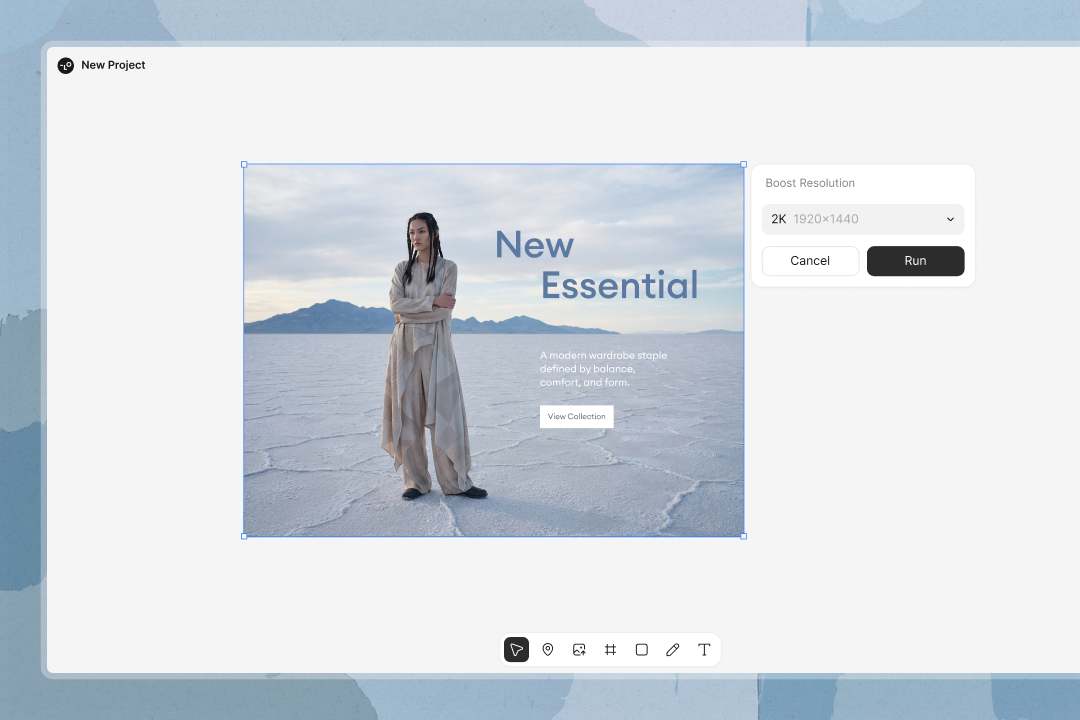
Touch Edit is one of Lovart’s editing features for making targeted changes to generated designs.
Instead of regenerating an entire project when only one element needs to change, users can select a particular area or element and request an adjustment. This can be useful when the overall composition works but certain details need refinement.
Lovart also provides text editing and element-level editing, allowing users to make more specific changes without rebuilding the complete design.
Brand Kit
Brand consistency is another major part of Lovart.
Users can save brand elements such as logos, colors, fonts, and other visual guidelines in a Brand Kit. These elements can then be applied across different creative projects.
This is particularly useful for businesses and marketing teams that need multiple advertisements, social posts, product visuals, or campaign assets to maintain a consistent visual identity.
Multi-Format Design
Lovart can also adapt creative work for different formats and channels.
The Design Canvas supports outputs such as 1:1, 16:9, 9:16, and print-oriented formats. This means a single creative brief can be used to create assets for social media, websites, advertising, and print without rebuilding every version manually.
AI Design Canvas
The Design Canvas provides a visual workspace for organizing and refining AI-generated content.
Users can bring in a brief, specify the required size and format, apply their Brand Kit, and generate a structured design. Individual blocks can then be edited using Touch Edit.
This approach can be useful for larger projects where several related assets need to remain visually consistent.
The Canvas can also be used for collaborative workflows, allowing users to review individual sections and make changes rather than regenerating an entire project.
Lovart for Marketing

Lovart has several features aimed at marketers and businesses.
Users can create product images, advertisements, social media graphics, banners, email graphics, landing-page visuals, and video content from a shared creative workflow.
The platform also supports product-focused workflows such as generating product listing images, lifestyle scenes, infographics, and promotional videos from existing product assets.
This makes it particularly relevant for e-commerce brands that need a large amount of visual content across multiple channels.
AI Agent Workflow
The agent-based approach is one of Lovart’s defining features.
Instead of manually selecting separate tools for every stage, users can describe the desired outcome and allow the AI to handle multiple parts of the creative process.
Lovart says its agent can research references, select suitable models, generate assets, and organize the results on its Canvas. Users can then review and refine the output through the same workspace.
This workflow is intended to reduce the need to move between different creative applications.
Export Options
Once a project is complete, Lovart provides several export options.
The platform currently supports formats including PNG, JPEG, SVG, PDF, and layered PSD, with print-oriented PDF options that can include CMYK and bleed settings. Its Design Suite also promotes 4K output and commercial-use rights for its generated content.
These options make the platform useful for both digital publishing and professional design workflows.
Lovart Pricing
Lovart provides a free starting option along with paid plans for users who need more credits and greater usage.
The platform uses a credit-based system, with credit consumption depending on the type and complexity of the task. Agent-based generations and Canvas projects can use different amounts of credits depending on the selected models, image size, quality, style, and other settings.
Monthly subscription credits reset with the billing cycle, while annual-plan credits are distributed monthly and unused credits do not roll over into the next cycle.
Because AI generation costs can vary significantly between different tasks, users should review the current credit requirements before starting larger projects.
Pros and Cons of Lovart
Pros
- AI design agent for end-to-end creative workflows
- Image and video generation in one platform
- Access to multiple AI image and video models
- Editable Canvas for organizing projects
- Touch Edit for targeted changes
- Brand Kit for consistent visual identity
- Supports product and marketing content
- Multiple export formats
- Useful for social, web, advertising, and print projects
- Free option available for getting started
Cons
- Credit usage can vary considerably between tasks
- More complex generations can consume credits quickly
- Beginners may need time to understand the large number of tools
- AI-generated designs can still require manual refinement
- Model availability and capabilities can change
- Heavy users may need a paid plan for regular production work
Who Is Lovart Best For?
Lovart can be useful for several types of creative users.
Designers can use it to speed up repetitive production tasks while retaining control over individual elements. Marketers can create campaign assets, advertisements, social posts, product visuals, and promotional videos from shared briefs.
E-commerce businesses can also benefit from product-focused workflows, especially when they need multiple product images, lifestyle scenes, advertisements, and short videos.
Content creators can use Lovart for thumbnails, social media graphics, video assets, illustrations, and other visual content.
For larger teams, Brand Kit and collaborative Canvas workflows can help maintain consistency across multiple creative projects.
Is Lovart Worth It?
Lovart takes a broader approach to AI design than a simple image generator. It combines AI image creation, video generation, editing, branding, multi-format design, and export capabilities within one workspace.
Its agent-based workflow can be useful for users who want to describe an outcome rather than manually manage every individual creative tool. The ability to work with multiple models, maintain a Brand Kit, edit individual elements, and export designs in different formats adds flexibility for professional workflows.
The main factor to consider is credit usage. Since the amount of credits required can change depending on the model, quality, size, and complexity of a task, frequent users should pay attention to how quickly their credits are consumed.
Final Verdict
Lovart is a broad AI design platform built for users who want to create, edit, brand, and export visual content from one workspace.
Its combination of AI design generation, image-to-video, text-to-video, Touch Edit, Brand Kit, Design Canvas, multi-model access, and marketing workflows gives it applications across design, e-commerce, advertising, and content creation.
For creators, marketers, designers, and businesses looking for an AI-powered creative workspace rather than a single-purpose generator, Lovart is worth considering.